
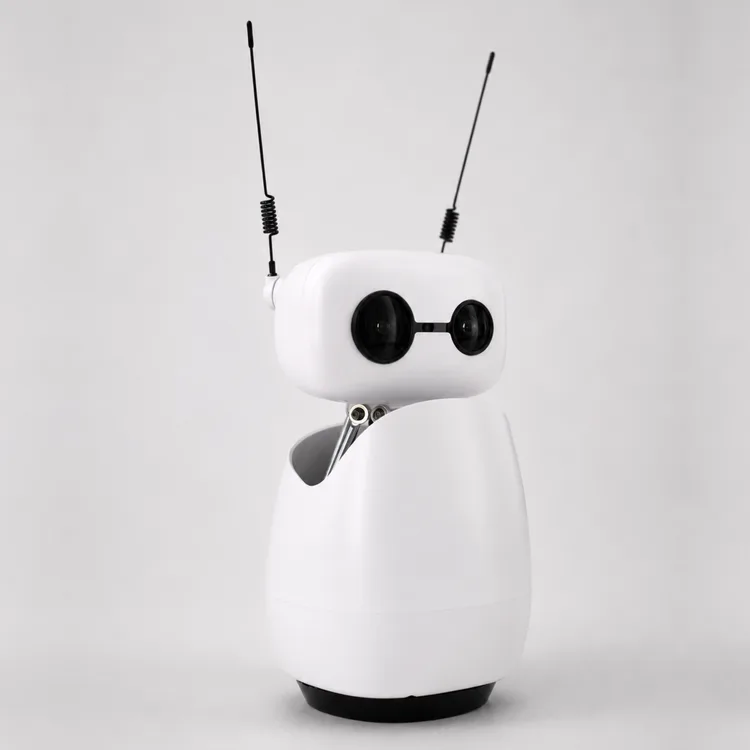
Reachy Mini
A build-it-yourself desk robot from Pollen Robotics and Hugging Face, with a nodding head, a camera and microphones. One family's kids adored it and it's great for learning AI, but the software is still rough.
We re-check daily. Try the manufacturer’s site meanwhile.
The short version
Reachy Mini is a small robot that sits on a desk and doesn't walk anywhere. It has a head that tilts and turns, a body that swivels, two waggly antennas, a camera, four microphones and a speaker. You build it from a kit, then install apps: chatting, following your hand, dancing and plenty more that owners have written. Everything, from the parts to the code, is open source.
There are two versions. The Wireless has its own small computer and battery, so it can run by itself. The cheaper Lite has to stay plugged into a computer that does the thinking. Either way, it's a hobby kit rather than a finished gadget. Setup can take some troubleshooting, and the chat app can send what it hears to an outside AI service unless you choose a local setup.
Our take: Buy Reachy Mini if you want to learn how AI robots work, enjoy building things and don't mind fixing connection problems. A curious child with a patient, techy adult will get the most from it. Skip it if you want a companion that just works when you switch it on; LivingAI's EMO is a finished desk character, and Vector 2.0 is a ready-made alternative.
Where it sits in Pollen Robotics’s range
- Reachy Mini LiteSame body, but needs a computer attached
- Reachy MiniThis model
- Reachy 2Pollen's full-size research humanoid
What reviewers found
Two owners have written up proper hands-on time with the Wireless version. Jeff Geerling built and tested it in February 2026, and Learn With A Robot spent ten days with it alongside his two sons. Both liked the build and the idea, and both found the software raw, with connection problems that needed restarts. They disagree on how long the kit takes to build. Hackaday has since reported an official fully local chat setup, which nobody has reviewed yet.
Jeff Geerling, hands-on, Feb 2026 · Learn With A Robot, hands-on, 10 days at home, Aug 2026
Software is still rough
This is the thing both testers agree on. Jeff Geerling hit network problems during setup and found it behaved differently depending on which computer and browser he used. Learn With A Robot often had to switch the robot off and on before the desktop app would connect, and switching between apps usually meant another restart. The maker itself calls it early in development Hugging Face. Expect to troubleshoot, and don't give it to someone who wants a finished gadget.
Children take to it
Learn With A Robot found his sons, aged 7 and 10, more absorbed in Reachy Mini than in any of the family's earlier robots, including Anki's. He puts it down to its cuteness and size: small enough for a desk, big enough to hug. Jeff Geerling's daughter chatted away to it too. For a family, that's a good sign, but an adult will still need to keep the software running.
Build time varies
Jeff Geerling built his in under two hours and praised the sturdy parts, the good fit and the decent screwdriver in the box. Learn With A Robot took about four hours on a first attempt, and warns that a loose connection made during assembly is yours to track down later. The maker says about two hours the specifications. Set aside an afternoon and treat the build as part of the fun.
Privacy depends on your setup
When Jeff Geerling tested it, the chat app connected to OpenAI without asking, and his daughter happily told it personal details about the family. Its control page on the home network also had no password. He wanted everything to run locally. Hackaday reported in June 2026 that there's now an official way to run the whole conversation on your own hardware. If children will use it, set that up first.
Demos are starting points
Jeff Geerling tried the conversation, puppet-recording, hand-tracking and radio apps and said they fell well short of what was shown at a big launch keynote; replaying recorded movements wasn't accurate. Learn With A Robot found writing and sharing your own apps easy, and his favourite was a dance app. Think of it as a robot you program, not one that entertains you straight out of the box.
Both hands-on reviews tested the Wireless version. The Lite has the same movement but must stay plugged into a computer.
Prices
Where to buy the Reachy Mini in Australia
No verified Australia price in the last 7 days. We re-check daily.
We’re still looking for more Australia retailers for this model. Prices shown are read from each seller’s own page.
Before you buy
The questions people ask about this one
What does it record, and where does that go?
It has a camera and four microphones the specifications. When Jeff Geerling tested it, the chat app sent conversations to OpenAI by default and the robot's control page had no password. Hackaday reports a fully local option now exists. Choose that if privacy matters, and keep the robot on a home network you trust.
Does it work offline?
It can. The Wireless version has its own computer and battery the specifications, and Hackaday describes an official setup that runs speech recognition, the AI model and the robot's voice on your own hardware. Jeff Geerling tested before that arrived, and the chat features he tried relied on an online service.
Is it suitable for young children?
With an adult in charge. Pollen doesn't give an age rating. Learn With A Robot's sons, aged 7 and 10, loved it, but he did the setup and restarts. Jeff Geerling's daughter shared family details with the chat app. It suits a child working alongside a techy adult, not a child on their own.
Wireless or Lite?
The Wireless has a built-in computer, Wi-Fi and a battery; the Lite must stay connected to a Mac or PC by USB, per the specifications. Movement is the same. Learn With A Robot found less difference than he expected, because he still used a desktop app to switch apps on the Wireless. Choose the Lite if it will live beside your computer anyway.
What happens if the company stops supporting it?
It's less of a worry than with most robots. The hardware, software and simulator are open source, according to Hugging Face, and Learn With A Robot found it easy to share apps through Hugging Face. Even if support ended, the code would still be available for owners to maintain.
Compare with
EMO
A finished desk character that dances and butts in while you work, with no kit to build.
Owners report patchy voice recognition, and some find its responses repetitive.
Doly
Another programmable, Raspberry Pi-based desk robot, with core features that run locally.
There's little independent evidence yet on how well it works day to day.
Vector 2.0
An expressive, ready-made desk robot that needs no assembly.
One owner reports stalls and reboots, and you can't reprogram it the way you can Reachy Mini.
Full specifications
Figures come from the manufacturer’s product page unless a source is named. A blank means nobody we trust has confirmed it.
Owner reviews
Own a Reachy Mini?
Tell people how it’s held up: cleaning, maintenance, faults and support. Owner reviews are shown separately from expert tests and never mixed into the score.
Sources
Everything cited on this page. Expert scores are shown as the reviewer gave them.
- Jeff Geerling: Testing Reachy Mini - Hugging Face's Pi powered robotHands-on
- Learn With A Robot: My first impressions of Reachy MiniHands-on, 10 days at home
- Hackaday: Reachy Mini desktop robot gets all-local conversational AINews
- Pollen Robotics: Reachy Mini product pageManufacturer
- Pollen Robotics store: Reachy Mini WirelessManufacturer
- Hugging Face: Reachy Mini launch postManufacturer