
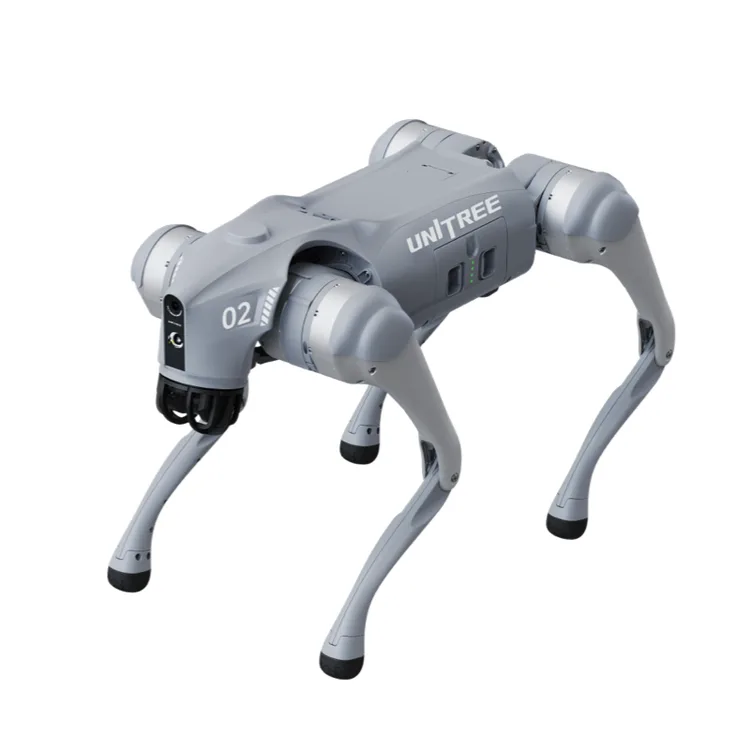
Go2 (Air / Pro)
One of the cheapest proper walking robot dogs you can buy. It moves remarkably well over rough ground, but reviewers keep asking the same thing: what do you actually do with it once the novelty wears off?
We re-check daily. Try the manufacturer’s site meanwhile.
The short version
The Go2 is Unitree's small four-legged robot, the replacement for the older Go1. It's about the size of a spaniel, weighs around 15kg and walks, trots, climbs kerbs and does tricks like handstands and paw shakes. There are four versions. The Air is the entry model, the Pro adds a follow-me remote, voice features and a faster top speed, and the X and EDU are aimed at developers and universities. The two home reviews both used the Pro.
The trade-off is purpose. It's a genuinely impressive machine for the money, but it isn't a pet, a guard or a helper. It's a remote-controlled gadget with a very clever body. Battery life is one to two hours, it takes practice to drive, and it gets scuffed. Shipping and import charges can add a lot if you buy direct from Unitree.
If you want to write your own code for it, look at the X or EDU. The Air and Pro only get simple block-style programming.
Our take: Buy the Go2 Pro if you love robotics, want something that turns heads in the park, and are happy for it to be an expensive hobby. Skip it if you want a companion that reacts to you like a pet; Sony's aibo is built for that. If you mainly want to learn to program a walking robot, a small kit like Petoi's Bittle X teaches the same ideas for far less.
Where it sits in Unitree’s range
- Unitree Go1The 2021 model it replaced
- Go2 (Air / Pro)This model
- Unitree Go2 EDUDeveloper version with bigger battery and full access
- R1Unitree's small humanoid · $4,900
- Unitree B2Large industrial robot dog
What reviewers found
Three looks at the Go2 so far: New Atlas and FauxHammer lived with the Pro, and iFixit took one apart and tested it on stairs. Everyone agrees it moves impressively and is fun, and both home reviewers struggled to say what it's for. All three found it capable once moving but not foolproof: it fell down steps for New Atlas, cracked its neck on stairs for iFixit, and dodged obstacles clumsily for FauxHammer. Neither home reviewer found the voice features dependable.
New Atlas, hands-on, May 2025 · FauxHammer, hands-on, Jun 2026 · iFixit, hands-on
Brilliant body, unclear purpose
New Atlas summed it up as fun on four legs but in need of a purpose, and told readers to think hard about what they'll do once the tricks get old. FauxHammer called it "not a sensible appliance purchase" while also rating it one of the coolest consumer gadgets around. So buy it as a hobby or a talking point. If you're hoping it will guard the house, fetch things or keep you company, neither reviewer found it doing that.
Rough ground: good once it's moving
FauxHammer took it up grassy slopes, dirt trails and uneven paths and was impressed by how it coped and recovered. New Atlas agrees kerbs and uneven surfaces are no problem once it's walking, but it must start from flat, smooth ground; even a grass verge caused trouble. Stairs are the weak spot. New Atlas saw it fall down its front steps, and iFixit says it could only sort of handle stairs. Walk it on steps until you trust it.
It takes practice to drive
New Atlas called learning to operate it "initially a daunting task" and ended up pausing the app's videos to take notes. FauxHammer liked what the app can show, including the live camera and a map of the space, but described it as "engineering-first, UX-later". Both say start-up needs care: lay it out properly on stable ground. When it fell while standing up for New Atlas, its legs thrashed until the tester reached in and pressed the power button.
Voice and obstacle dodging are patchy
The Pro can take spoken commands, but FauxHammer found activation and recognition inconsistent and the replies "functional rather than characterful". Its obstacle avoidance was "overcautious or confused" in cluttered spaces, which also made follow mode path a bit oddly. New Atlas got the follow-me remote working and could steer it with leash pulls. Treat these as party tricks rather than reasons to choose the Pro over the Air.
Repairable, but it will get marked
iFixit found the battery easy to swap by hand and the design fairly modular, with plastic collars at the hips meant to break before the joints do. But it couldn't order legs or motors directly, just a contact form, and the sensor in its chin is buried deep. Its unit cracked inside the neck during stair testing. New Atlas and FauxHammer both scuffed the knees on concrete. Expect wear, and ask your seller about repairs before you buy.
New Atlas and FauxHammer used the Go2 Pro; iFixit doesn't say which version it took apart. The Air is slower and lacks voice and the follow remote; the X and EDU are developer models.
Prices
Where to buy the Go2 (Air / Pro) in United States
No verified United States price in the last 7 days. We re-check daily.
We’re still looking for more United States retailers for this model. Prices shown are read from each seller’s own page.
Before you buy
The questions people ask about this one
Is it a toy, a pet or a development platform?
Closest to an expensive toy. Neither New Atlas nor FauxHammer found a practical job for the Pro beyond showing it off, and it doesn't bond with you like a pet robot. Deeper programming is only on the X and EDU, per the specifications.
Can it go outside and up stairs?
Outside, yes. FauxHammer walked it on grassy slopes and dirt trails, though New Atlas needed flat ground to start it. Stairs are less reliable: it fell down steps for New Atlas, and iFixit found internal damage after stair testing. Unitree claims the Pro climbs about 16cm, per the specifications.
How long does the battery last?
Unitree says one to two hours on the Air, Pro and X, per the specifications, and FauxHammer got about two hours, less in the fast mode. The battery comes out by hand, as iFixit found, so a spare extends your time out. The EDU's bigger battery is claimed to last two to four hours.
Can I program it?
A little. All versions get graphical programming, per the specifications, and New Atlas built simple drag-and-drop routines in the app and walked it back to points on a map. Proper development access is limited to the X and EDU. If learning to code a walking robot is the goal, a cheaper kit is a better start.
Is it safe around children and pets?
With space and supervision. FauxHammer warns it's heavy and fast enough to clip ankles or knees if it tips or starts a trick in a tight spot. New Atlas points out its 12 motors can scratch or pinch you if you have to reach in and switch it off. Unitree doesn't give an age guide.
What does it cost to repair?
No public repair price list exists. iFixit found the battery and legs fairly easy to replace, but couldn't order legs or motors directly. Unitree's own shop does list spare Go2 batteries, controllers and chargers, and the warranty is six months on the Air and a year on the Pro, per the specifications.
Compare with
aibo ERS-1000
It's a robot pet first: owners love its autonomous play, ball games and the personality it develops.
Many settings depend on Sony's cloud plan, and a second-hand one needs an account transfer.
R1
Unitree's small humanoid is another way into walking robots, with development options if you want to go further.
It's a robotics project that needs a technical owner, and the starting version lacks much of what the demos show.
Full specifications
Figures come from the manufacturer’s product page unless a source is named. A blank means nobody we trust has confirmed it.
Owner reviews
Own a Go2 (Air / Pro)?
Tell people how it’s held up: cleaning, maintenance, faults and support. Owner reviews are shown separately from expert tests and never mixed into the score.
Sources
Everything cited on this page. Expert scores are shown as the reviewer gave them.
- New Atlas: Review: Unitree Go2 Pro robot is fun on four legs – but it needs a purpose in lifeHands-on
- FauxHammer: UniTree Go 2 Pro review: what's the point of a robot dog, really?Hands-on
- iFixit: Unitree Go2 teardown and repairabilityHands-on
- Unitree: Go2 product specificationsManufacturer
- Unitree shop: Go2 store page and spare partsManufacturer