
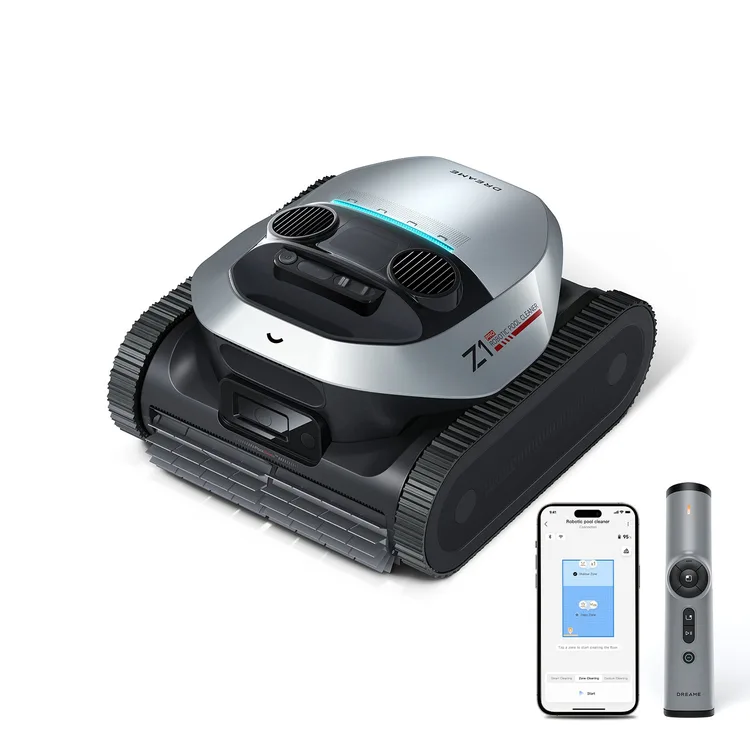
Z1 Pro
Dreame's cordless pool robot with an underwater remote control. It has strong claimed suction and a clever magnetic charger, but the remote is fiddly and one long test found its cleaning slow and patchy until a software update.
See the alternatives below, or switch market.
The short version
The Z1 Pro is the top of Dreame's small pool range, above the plain Z1. It cleans the floor, walls and waterline, and drives along the waterline sideways rather than just bobbing up and down. What the Pro adds is a hand-held remote that talks to the robot with pulses of light, so you can steer it or call it to the edge while it's underwater. Dreame also claims a little more coverage than the Z1.
The trade-off is speed and consistency. One tester found it crawled round the pool and missed a lot of storm debris at first, and only got good after a firmware update. The remote needs aiming and waving before it listens. Charging takes four to six hours, and once it's parked at the edge it only waits about five minutes before sinking again. It's also a heavy robot to lift out.
In some countries Dreame's own shops sell only the plain Z1. Everything on this page is about the Pro.
Our take: Buy it if you want a cordless robot for the floor, walls and waterline of a small or medium pool, and you like the idea of calling it up with a remote rather than a hook. Be ready to give it a few runs and keep the firmware updated. If you'd rather it floated up and waited for you, the Beatbot AquaSense 2 does that. If you want a robot that heads for debris by itself, look at the Aiper Scuba V3.
Where it sits in Dreame’s range
- Dreame Z1Same claimed suction, no remote, slightly smaller claimed coverage
- Z1 ProThis model
- Dreame J1A surface skimmer rather than an underwater cleaner
What reviewers found
Two hands-on tests that land in different places. Android Authority ran it over two days in a small pool that already looked clean and was impressed by how much dirt it still picked up. PCWorld tested it for longer, with real storm debris and scattered leaves, and found it slow and patchy until a firmware update lifted it to about 90 per cent pickup. Both liked the magnetic charger, both found the remote hit and miss, and PCWorld rated the app highly.
Android Authority, hands-on · PCWorld, hands-on
Cleaning depends on the firmware
PCWorld dropped it into a pool full of storm debris and, after three hours, found the basket less than half full and the pool barely touched. It only picked up about two-thirds of a batch of test leaves. After a firmware update and six full runs, pickup rose to roughly 90 per cent, though debris was still left on and around the steps. Android Authority's pool was already clean to the eye, yet the basket came out with plenty of gunk. Update it before judging it.
The remote works, eventually
The light-based remote is the Pro's big extra. Android Authority could always get the robot to do what it wanted, but sometimes only after several tries, and Dreame's advice is to wave the remote around. PCWorld's first remote was dead on arrival. The replacement often needed up to a minute of pressing and waving, so the tester ended up using it only to call the robot to the waterline for collection. Treat it as a handy recall button, not a steering wheel.
Slow, and collection is time-limited
PCWorld called it one of the slowest pool robots it has tested, crawling across the floor, and once found it spinning in one spot for nearly ten minutes mid-run. When it finishes, it climbs to the waterline and holds on for only five minutes before sinking back down. Android Authority liked the auto-parking at the edge, which saves fishing for it. If you can't be poolside when a run ends, keep an eye on the app notifications or keep the hook handy.
Easy charging, but not quick
Both testers liked the magnetic charger, which snaps on without plugs or rubber seals. PCWorld found a small cloth on the cable for drying the contacts. The catch, per Android Authority, is time: four to six hours for a full charge, the slowest of the mains-charged robots it tested. Battery life was ample in its small pool, finishing a run with over 60 per cent left. Charge it overnight rather than between back-to-back cleans.
An app that maps the pool
PCWorld rated the app as perhaps the best it has used, and the first to draw a map of the pool after a run. The first map of its L-shaped pool was reasonable, but later ones were much worse. End-of-run reports were usually accurate, though one claimed a two-hour run had cleaned just three square metres. The single-piece basket lifts out of a top hatch and opens on a hinge, which PCWorld found easy to empty.
Both reviews date from 2025. PCWorld's results changed after a firmware update during testing.
Prices
Where to buy the Z1 Pro in Australia
Not sold in Australia. Switch market above, or see the alternatives below.
Before you buy
The questions people ask about this one
Does it climb walls and clean the waterline?
Yes. It has floor, wall, waterline and all-in-one modes, per the specifications, and moves sideways along the waterline rather than just up and down. Android Authority used the standard mode, which does the lot. Neither review dwells on waterline results, so how well it scrubs a scum line is still an open question.
How do I get it out of the water?
It climbs to the waterline and parks when it's done, and you can call it there with the remote. PCWorld found it only holds on for five minutes before sinking, after which you need the included hook or another try with the remote. It's heavy, at about 27 pounds according to PCWorld.
Does it handle leaves as well as fine dirt?
It got better with updates. PCWorld found it missed a third of its test leaves at first and reached about 90 per cent pickup after a firmware update, still leaving bits around the steps. Android Authority found it lifted plenty of fine gunk from a pool that looked clean. The filter is a 180-micron basket, per the specifications.
Is it cordless, and how long does a charge last?
It's cordless, with over 180 minutes claimed for floor cleaning in Eco mode, per the specifications. Android Authority had over 60 per cent left after a full run in a small pool. Charging is slow, though: four to six hours on the magnetic lead.
Does it need an app?
No, you can pick a mode with the button on top, per the specifications, and steer it with the remote. The app adds scheduling, cleaning reports and a pool map, which PCWorld rated very highly, though its maps and reports weren't always accurate. The app only connects when the robot is out of the water.
Compare with
AquaSense 2
It cleans the floor, walls and waterline and floats to the edge when done, so collecting it is easier.
Testers found steps and fine silt hit and miss, and it doesn't skim.
Scuba V3
It's lighter, and a camera spots debris and drives to it; three testers found it cleans well.
You get only about ten minutes to collect it before it sinks.
C2
A simpler cordless robot that two testers found effective on everyday debris across floor, walls and waterline.
A third tester found its suction weak.
Full specifications
Figures come from the manufacturer’s product page unless a source is named. A blank means nobody we trust has confirmed it.
Owner reviews
Own a Z1 Pro?
Tell people how it’s held up: cleaning, maintenance, faults and support. Owner reviews are shown separately from expert tests and never mixed into the score.
Sources
Everything cited on this page. Expert scores are shown as the reviewer gave them.